If you’re looking for a resource to use to support independent study, W3 schools is a better option than this page
this material is largely intended to support our live interactive training sessions
we use posit.cloud for this course. Although that platform is mainly meant for analysts writing R code, we can trick it to allow us to practice our SQL skills
About this session
This session is all about using two key patterns in SQL:
filtering to find matching rows of data in a table
then aggregating that data to produce useful summaries
Setup
You will need a free posit.cloud account. Please set this up and check that you have access before the session begins
Once you’ve logged-in to posit.cloud, please create a new Rstudio project from Github Repository
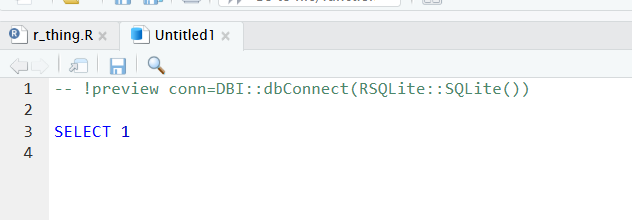
now create a new SQL script (again, from the File menu)
delete all the pre-populated lines of code, as follows:
to connect with our SQL db in memory, add the following line to the head of your SQL script:
-- !preview conn=src_memdb()$con
finally, save your SQL script (any file name is fine)
Finding matching rows
we can filter rows by values with the WHERE keyword. For example:
SELECT*FROM penguins WHERE flipper_length_mm=181;
7 records
species
island
bill_length_mm
bill_depth_mm
flipper_length_mm
body_mass_g
sex
year
Adelie
Torgersen
39.1
18.7
181
3750
male
2007
Adelie
Torgersen
38.9
17.8
181
3625
female
2007
Adelie
Dream
37.6
19.3
181
3300
female
2007
Adelie
Biscoe
36.5
16.6
181
2850
female
2008
Adelie
Biscoe
38.1
17.0
181
3175
female
2009
Chinstrap
Dream
58.0
17.8
181
3700
female
2007
Chinstrap
Dream
42.4
17.3
181
3600
female
2007
or:
SELECT*FROM penguins WHERE species='Adelie'; -- single quotes for preference
Displaying records 1 - 10
species
island
bill_length_mm
bill_depth_mm
flipper_length_mm
body_mass_g
sex
year
Adelie
Torgersen
39.1
18.7
181
3750
male
2007
Adelie
Torgersen
39.5
17.4
186
3800
female
2007
Adelie
Torgersen
40.3
18.0
195
3250
female
2007
Adelie
Torgersen
NA
NA
NA
NA
NA
2007
Adelie
Torgersen
36.7
19.3
193
3450
female
2007
Adelie
Torgersen
39.3
20.6
190
3650
male
2007
Adelie
Torgersen
38.9
17.8
181
3625
female
2007
Adelie
Torgersen
39.2
19.6
195
4675
male
2007
Adelie
Torgersen
34.1
18.1
193
3475
NA
2007
Adelie
Torgersen
42.0
20.2
190
4250
NA
2007
these filters are combinable. So we can find combinations where several conditions are all true using the AND keyword:
SELECT*FROM penguins WHERE species ='Adelie'AND sex ='male'AND island ='Biscoe';
Displaying records 1 - 10
species
island
bill_length_mm
bill_depth_mm
flipper_length_mm
body_mass_g
sex
year
Adelie
Biscoe
37.7
18.7
180
3600
male
2007
Adelie
Biscoe
38.2
18.1
185
3950
male
2007
Adelie
Biscoe
38.8
17.2
180
3800
male
2007
Adelie
Biscoe
40.6
18.6
183
3550
male
2007
Adelie
Biscoe
40.5
18.9
180
3950
male
2007
Adelie
Biscoe
40.1
18.9
188
4300
male
2008
Adelie
Biscoe
42.0
19.5
200
4050
male
2008
Adelie
Biscoe
41.4
18.6
191
3700
male
2008
Adelie
Biscoe
40.6
18.8
193
3800
male
2008
Adelie
Biscoe
37.6
19.1
194
3750
male
2008
or combinations where either are true using OR:
SELECT*FROM penguins WHERE sex <>'male'OR island ='Biscoe'; -- <> = not equal
Displaying records 1 - 10
species
island
bill_length_mm
bill_depth_mm
flipper_length_mm
body_mass_g
sex
year
Adelie
Torgersen
39.5
17.4
186
3800
female
2007
Adelie
Torgersen
40.3
18.0
195
3250
female
2007
Adelie
Torgersen
36.7
19.3
193
3450
female
2007
Adelie
Torgersen
38.9
17.8
181
3625
female
2007
Adelie
Torgersen
41.1
17.6
182
3200
female
2007
Adelie
Torgersen
36.6
17.8
185
3700
female
2007
Adelie
Torgersen
38.7
19.0
195
3450
female
2007
Adelie
Torgersen
34.4
18.4
184
3325
female
2007
Adelie
Biscoe
37.8
18.3
174
3400
female
2007
Adelie
Biscoe
37.7
18.7
180
3600
male
2007
NoteExercise
are there any Adelie penguins not from Torgersen Island that weight less than 3500g with flippers that are at least 190mm long?
WHERE helpers
there are several keywords to sweeten the job of building a WHERE query. First, there’s a BETWEEN keyword to help find values in ranges:
SELECT*FROM penguins WHERE bill_length_mm BETWEEN37.8AND38;
7 records
species
island
bill_length_mm
bill_depth_mm
flipper_length_mm
body_mass_g
sex
year
Adelie
Torgersen
37.8
17.1
186
3300
NA
2007
Adelie
Torgersen
37.8
17.3
180
3700
NA
2007
Adelie
Biscoe
37.8
18.3
174
3400
female
2007
Adelie
Biscoe
37.9
18.6
172
3150
female
2007
Adelie
Biscoe
37.8
20.0
190
4250
male
2009
Adelie
Biscoe
37.9
18.6
193
2925
female
2009
Adelie
Dream
37.8
18.1
193
3750
male
2009
for text columns, you might find LIKE with wildcards helpful. % stands for one or more character, while _ stands for exactly one character:
SELECT*FROM penguins WHERE island LIKE'Tor%';
Displaying records 1 - 10
species
island
bill_length_mm
bill_depth_mm
flipper_length_mm
body_mass_g
sex
year
Adelie
Torgersen
39.1
18.7
181
3750
male
2007
Adelie
Torgersen
39.5
17.4
186
3800
female
2007
Adelie
Torgersen
40.3
18.0
195
3250
female
2007
Adelie
Torgersen
NA
NA
NA
NA
NA
2007
Adelie
Torgersen
36.7
19.3
193
3450
female
2007
Adelie
Torgersen
39.3
20.6
190
3650
male
2007
Adelie
Torgersen
38.9
17.8
181
3625
female
2007
Adelie
Torgersen
39.2
19.6
195
4675
male
2007
Adelie
Torgersen
34.1
18.1
193
3475
NA
2007
Adelie
Torgersen
42.0
20.2
190
4250
NA
2007
SELECT*FROM penguins WHERE species LIKE'Ad_lie';
Displaying records 1 - 10
species
island
bill_length_mm
bill_depth_mm
flipper_length_mm
body_mass_g
sex
year
Adelie
Torgersen
39.1
18.7
181
3750
male
2007
Adelie
Torgersen
39.5
17.4
186
3800
female
2007
Adelie
Torgersen
40.3
18.0
195
3250
female
2007
Adelie
Torgersen
NA
NA
NA
NA
NA
2007
Adelie
Torgersen
36.7
19.3
193
3450
female
2007
Adelie
Torgersen
39.3
20.6
190
3650
male
2007
Adelie
Torgersen
38.9
17.8
181
3625
female
2007
Adelie
Torgersen
39.2
19.6
195
4675
male
2007
Adelie
Torgersen
34.1
18.1
193
3475
NA
2007
Adelie
Torgersen
42.0
20.2
190
4250
NA
2007
or, possibly, you could select from a group of values using IN:
SELECT*FROM penguins WHERE island IN ('Dream', 'Biscoe');
Displaying records 1 - 10
species
island
bill_length_mm
bill_depth_mm
flipper_length_mm
body_mass_g
sex
year
Adelie
Biscoe
37.8
18.3
174
3400
female
2007
Adelie
Biscoe
37.7
18.7
180
3600
male
2007
Adelie
Biscoe
35.9
19.2
189
3800
female
2007
Adelie
Biscoe
38.2
18.1
185
3950
male
2007
Adelie
Biscoe
38.8
17.2
180
3800
male
2007
Adelie
Biscoe
35.3
18.9
187
3800
female
2007
Adelie
Biscoe
40.6
18.6
183
3550
male
2007
Adelie
Biscoe
40.5
17.9
187
3200
female
2007
Adelie
Biscoe
37.9
18.6
172
3150
female
2007
Adelie
Biscoe
40.5
18.9
180
3950
male
2007
you can also build simple expressions inside the WHERE statement to help capture more complex segments of your data:
SELECT*FROM penguins WHERE (flipper_length_mm * bill_depth_mm) =3628.4;
1 records
species
island
bill_length_mm
bill_depth_mm
flipper_length_mm
body_mass_g
sex
year
Adelie
Biscoe
40.6
18.8
193
3800
male
2008
Keyword order
we’ve already looked at several examples where we’ve combined together keywords. For example, we can use SELECT, FROM, WHERE and OR together to retrieve all the flipper lengths for all the non-male penguins and/or all the penguins that live on Biscoe island:
SELECT flipper_length_mm FROM penguins WHERE sex <>'male'OR island ='Biscoe';
Displaying records 1 - 10
flipper_length_mm
186
195
193
181
182
185
195
184
174
180
this order is important: SQL keywords have an order in which they must be written
for our purposes, we’ll need to build each of our queries in the following order:
SELECT
FROM
WHERE
GROUP BY
ORDER BY
Ordering
for example, ORDER BY is written at the end of the query:
SELECT species, flipper_length_mm FROM penguins WHERE sex <>'male'OR island ='Biscoe'ORDERBY flipper_length_mm;
Displaying records 1 - 10
species
flipper_length_mm
Gentoo
NA
Adelie
172
Adelie
174
Adelie
176
Adelie
178
Adelie
178
Chinstrap
178
Adelie
180
Adelie
180
Adelie
180
it’s good practice to be explicit about order direction, so you might add the ASC keyword to specify that you want to order your data in ascending order:
SELECT*FROM penguins WHERE sex <>'male'ORDERBY flipper_length_mm ASC;
Displaying records 1 - 10
species
island
bill_length_mm
bill_depth_mm
flipper_length_mm
body_mass_g
sex
year
Adelie
Biscoe
37.9
18.6
172
3150
female
2007
Adelie
Biscoe
37.8
18.3
174
3400
female
2007
Adelie
Torgersen
40.2
17.0
176
3450
female
2009
Adelie
Dream
39.5
16.7
178
3250
female
2007
Adelie
Dream
33.1
16.1
178
2900
female
2008
Chinstrap
Dream
46.1
18.2
178
3250
female
2007
Adelie
Dream
42.2
18.5
180
3550
female
2007
Adelie
Torgersen
38.9
17.8
181
3625
female
2007
Adelie
Dream
37.6
19.3
181
3300
female
2007
Adelie
Biscoe
36.5
16.6
181
2850
female
2008
or we could reverse-order using DESC:
SELECT*FROM penguins WHERE bill_depth_mm >20ORDERBY bill_depth_mm DESC;
Displaying records 1 - 10
species
island
bill_length_mm
bill_depth_mm
flipper_length_mm
body_mass_g
sex
year
Adelie
Torgersen
46.0
21.5
194
4200
male
2007
Adelie
Torgersen
38.6
21.2
191
3800
male
2007
Adelie
Dream
42.3
21.2
191
4150
male
2007
Adelie
Torgersen
34.6
21.1
198
4400
male
2007
Adelie
Dream
39.2
21.1
196
4150
male
2007
Adelie
Biscoe
41.3
21.1
195
4400
male
2008
Chinstrap
Dream
54.2
20.8
201
4300
male
2008
Adelie
Torgersen
42.5
20.7
197
4500
male
2007
Adelie
Biscoe
39.6
20.7
191
3900
female
2009
Chinstrap
Dream
52.0
20.7
210
4800
male
2008
or order by multiple columns in different directions:
SELECT*FROM penguins WHERE bill_depth_mm >20ORDERBY island ASC, bill_depth_mm DESC;
Displaying records 1 - 10
species
island
bill_length_mm
bill_depth_mm
flipper_length_mm
body_mass_g
sex
year
Adelie
Biscoe
41.3
21.1
195
4400
male
2008
Adelie
Biscoe
39.6
20.7
191
3900
female
2009
Adelie
Biscoe
45.6
20.3
191
4600
male
2009
Adelie
Dream
42.3
21.2
191
4150
male
2007
Adelie
Dream
39.2
21.1
196
4150
male
2007
Chinstrap
Dream
54.2
20.8
201
4300
male
2008
Chinstrap
Dream
52.0
20.7
210
4800
male
2008
Adelie
Dream
41.3
20.3
194
3550
male
2008
Chinstrap
Dream
51.7
20.3
194
3775
male
2007
Adelie
Dream
40.2
20.1
200
3975
male
2009
NoteExercise
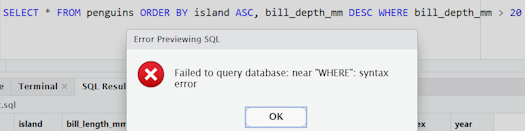
as an experiment, try re-ordering the previous SQL query so that the WHERE and ORDER BY sections occur in reverse order
it will cause an error, and that’s to be expected
Aggregation
effectively, we apply a keyword to the columns specified in the SELECT to aggregate:
SELECTMIN(bill_depth_mm) FROM penguins;
1 records
MIN(bill_depth_mm)
13.1
rename your summary columns using AS:
SELECTMAX(bill_depth_mm) AS big_bill FROM penguins;
1 records
big_bill
21.5
you can specify a column to group your data by - just beware of the keyword order!
SELECT species, SUM(bill_depth_mm) AS total_bill_depth FROM penguins GROUPBY species;
3 records
species
total_bill_depth
Adelie
2770.3
Chinstrap
1252.6
Gentoo
1842.8
and you can group by multiple variables at once:
SELECT species, sex, SUM(bill_depth_mm) AS total_bill_depth FROM penguins GROUPBY species, sex;
8 records
species
sex
total_bill_depth
Adelie
NA
91.6
Adelie
female
1286.4
Adelie
male
1392.3
Chinstrap
female
598.0
Chinstrap
male
654.6
Gentoo
NA
58.2
Gentoo
female
825.8
Gentoo
male
958.8
it’s possible (but confusing) to group by an implicit group. If we remove sex from the SELECT part of the above query, for example, we end up with (apparently) multiple rows per group:
SELECT species, SUM(bill_depth_mm) AS total_bill_depth FROM penguins GROUPBY species, sex;
8 records
species
total_bill_depth
Adelie
91.6
Adelie
1286.4
Adelie
1392.3
Chinstrap
598.0
Chinstrap
654.6
Gentoo
58.2
Gentoo
825.8
Gentoo
958.8
you can chain together multiple aggregation keywords to produce more complex results:
SELECT species, ROUND(AVG(bill_depth_mm), 1) AS average_bill_depth FROM penguins GROUPBY species;
3 records
species
average_bill_depth
Adelie
18.3
Chinstrap
18.4
Gentoo
15.0
COUNT is especially useful to count the number of rows in a filtered dataset
do note there can be dialect issues here, with several possible approaches to counting rows that may (or may not) work in your dialect of SQL
for example, the lovely concise DISTINCT shorthand is great, but unfortunately won’t work everywhere:
SELECTCOUNT(DISTINCT island) FROM penguins;
1 records
COUNT(DISTINCT island)
3
this could also be used with a rename in place:
SELECTCOUNT(DISTINCT island) AS peng_count FROM penguins;
1 records
peng_count
3
as a longer, but probably safer, alternative, and permitting several categories to be counted together:
SELECTCOUNT(*) AS peng_count FROM (SELECTDISTINCT island, species FROM penguins);
1 records
peng_count
5
or, failing that:
SELECT island AS landmass, COUNT(*) AS [male n] FROM penguins WHERE sex ='male'GROUPBY island ;
3 records
landmass
male n
Biscoe
83
Dream
62
Torgersen
23
if you’re trying to understand missing data, you should use the NULL keyword:
SELECT*FROM penguins WHERE bill_length_mm ISNULL; -- really important if you're aggregating
2 records
species
island
bill_length_mm
bill_depth_mm
flipper_length_mm
body_mass_g
sex
year
Adelie
Torgersen
NA
NA
NA
NA
NA
2007
Gentoo
Biscoe
NA
NA
NA
NA
NA
2009
and there are some shortcuts for concatenating multiple columns together:
SELECTCONCAT(species,', ', island) AS species_land from penguins ;-- but be aware this can be very quirky across different SQL dialects
Displaying records 1 - 10
species_land
Adelie, Torgersen
Adelie, Torgersen
Adelie, Torgersen
Adelie, Torgersen
Adelie, Torgersen
Adelie, Torgersen
Adelie, Torgersen
Adelie, Torgersen
Adelie, Torgersen
Adelie, Torgersen
SQL query summary
Code
-- SetupSELECT*FROM penguins; -- to check everything is working by calling up the whole penguins table-- WHERESELECT*FROM penguins WHERE flipper_length_mm=181; -- filtering rows by numeric value, where flipper_length_mm is 181SELECT*FROM penguins WHERE species='Adelie'; -- filtering rows by character value, using single quotes for preferenceSELECT*FROM penguins WHERE species ='Adelie'AND sex ='male'AND island ='Biscoe'; -- combining multiple filters with ANDSELECT*FROM penguins WHERE sex <>'male'OR island ='Biscoe'; -- <> = not equal, combining filters with OR-- EXERCISE - are there any Adelie penguins not from Torgersen Island that weight less than 3500g with flippers that are at least 190mm long?SELECT*from penguins WHERE species ='Adelie'AND island <>'Torgersen'AND body_mass_g <3500AND flipper_length_mm >=190;- (that should be 11rows)-- WHERE helpersSELECT*FROM penguins WHERE bill_length_mm BETWEEN37.8AND38; -- finding values in range with BETWEENSELECT*FROM penguins WHERE island LIKE'Tor%'-- wildcard matchingSELECT*FROM penguins WHERE species LIKE'Ad_lie'-- wildcard matching single characterSELECT*FROM penguins WHERE island IN ('Dream', 'Biscoe') -- select from a group of valuesSELECT*FROM penguins WHERE (flipper_length_mm * bill_depth_mm) =3628.4-- select with an expression-- Keyword orderingSELECT flipper_length_mm FROM penguins WHERE sex <>'male'OR island ='Biscoe'-- reminder about keyword orderSELECT species, flipper_length_mm FROM penguins WHERE sex <>'male'OR island ='Biscoe'ORDERBY flipper_length_mm -- ORDER BY at end of query-- Column orderingSELECT*FROM penguins WHERE sex <>'male'ORDERBY flipper_length_mm ASC-- implicit ordering can be troublesome. Default is ASCSELECT*FROM penguins WHERE bill_depth_mm >20ORDERBY bill_depth_mm DESC-- descending ordering with DESCSELECT*FROM penguins WHERE bill_depth_mm >20ORDERBY island ASC, bill_depth_mm DESC-- hierarchical ordering-- AggregationSELECTMIN(bill_depth_mm) FROM penguins; -- to find the minimum value from bill_depth_mmSELECTMAX(bill_depth_mm) AS big_bill FROM penguins; -- rename summary columnsSELECT species, SUM(bill_depth_mm) AS total_bill_depth FROM penguins GROUPBY species; -- specify a column to group your data bySELECT species, sex, SUM(bill_depth_mm) AS total_bill_depth FROM penguins GROUPBY species, sex; -- specify several columns to group bySELECT species, sex, SUM(bill_depth_mm) AS total_bill_depth FROM penguins GROUPBY species, sex; -- you can also use implicit groups, but this is confusing in that we end up with several rows per group SELECT species, ROUND(AVG(bill_depth_mm), 1) AS average_bill_depth FROM penguins GROUPBY species; -- multiple aggregation keywords, like a rounded averageSELECTCOUNT(DISTINCT island) FROM penguins; -- find distinct rowsSELECTCOUNT(DISTINCT island) AS peng_count FROM penguins; -- distinct with renameSELECTCOUNT(*) AS peng_count FROM (SELECTDISTINCT island, species FROM penguins); -- variant syntax to count several categories at onceSELECT island AS landmass, COUNT(*) AS [male n] FROM penguins WHERE sex ='male'GROUPBY island; -- variant with renameSELECT*FROM penguins WHERE bill_length_mm ISNULL; -- really important to know about null values if you're aggregatingSELECT CONCAT(species,', ', island) AS species_land from penguins; -- merge columns
Acknowledgements
Like all our courses and sessions, this is a team effort, and I thank the network as a whole for their encouragements and contributions. Specific thanks in this case go to Ben Harley (PHS), Amanda King (NHS GGC), Steven Knapman (NHS Fife), and James McMahon (Public Health Scotland), and to the members of the pilot cohort for this session.